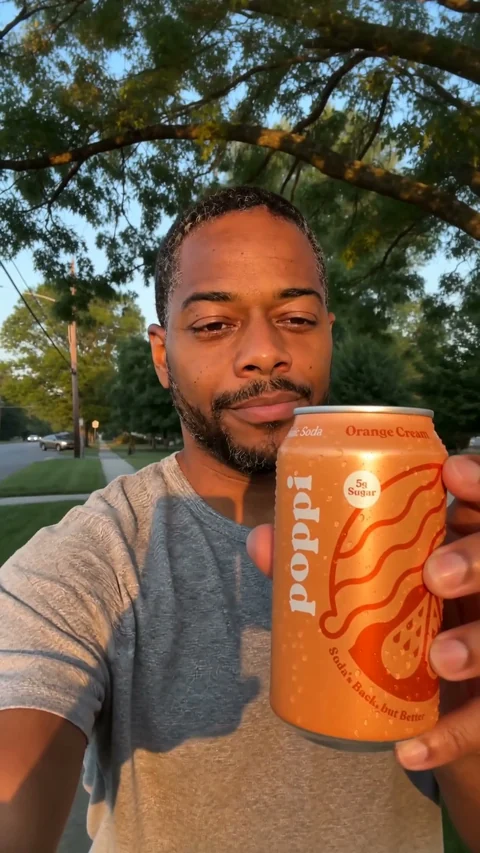
Most AI ad variants swap faces on the same script. That tests faces. It tells you nothing about why someone buys.
Spend the first hour in Claude or ChatGPT figuring out what a real buyer believes and what single shift gets them to buy. Only then open Higgsfield. Starting at the customer instead of the camera saves hours of wasted generations.
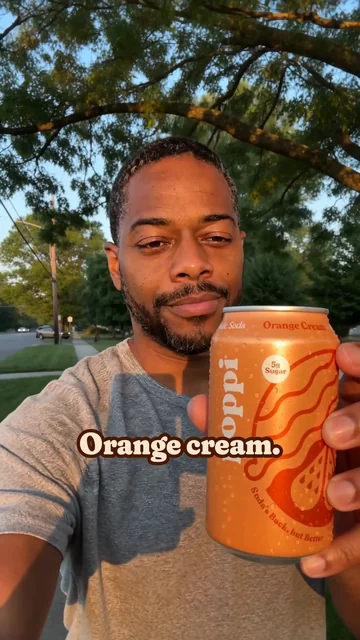
One narrow audience, one saved creator, one real pack shot, and three distinct buyer beliefs. These three cuts were rolled via Higgsfield’s CLI in plain UGC mode (4 takes rolled into 3 finished 1080p cuts in 17 minutes of elapsed time); the seven steps below translate that exact belief-first workflow for any team working in a browser.
Unofficial spec. Not made for or approved by poppi or PepsiCo. Both presenters are AI-generated.
9:16 web cut (720p), 18 s, with sound · AI presenter.
Problem aware
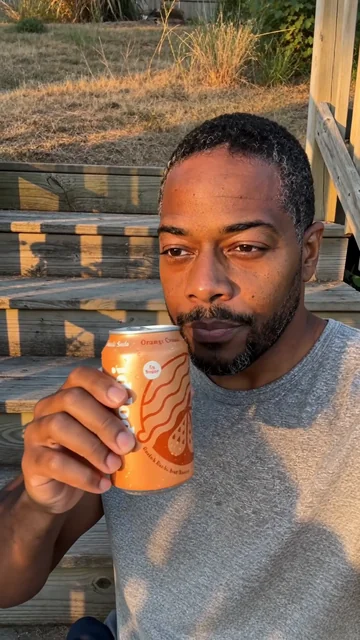
D. “Since I was a kid”
Name the exact soda he misses, then show his first sip on camera.
Spoken lines & audio notes
“I quit soda three years ago. The one I actually miss is orange cream. I haven’t had one since I was a kid.” [takes a sip, pauses, nods slowly] “Okay... Yep. That’s it. That’s the one. Five grams of sugar.” Ends on the animated Orange Cream end card (“Soda’s back. · 5g sugar”) with a can-open sound effect.
9:16 web cut (720p), 18 s, with sound · AI presenter.
Product aware
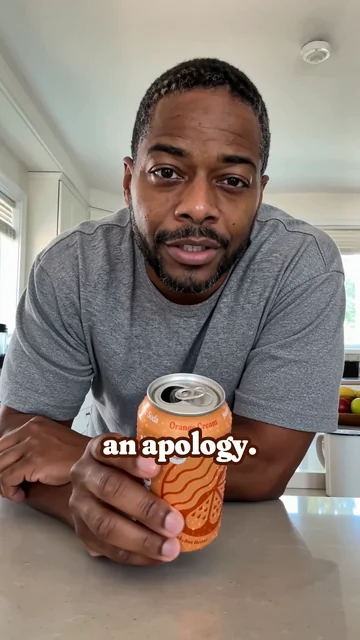
E. “I owe her an apology”
Let him admit from his own kitchen counter that he misjudged the drink.
Spoken lines & audio notes
“My wife keeps buying these and I never touched one. I figured it was a wellness thing. We ran out of everything else.” [looks at the can, then back to camera] “I owe her an apology. Orange cream. Five grams of sugar. It’s just good soda.” Ends on the animated Orange Cream end card with a can-open sound effect.
9:16 web cut (720p), 18 s, with sound · AI presenter.
Most aware
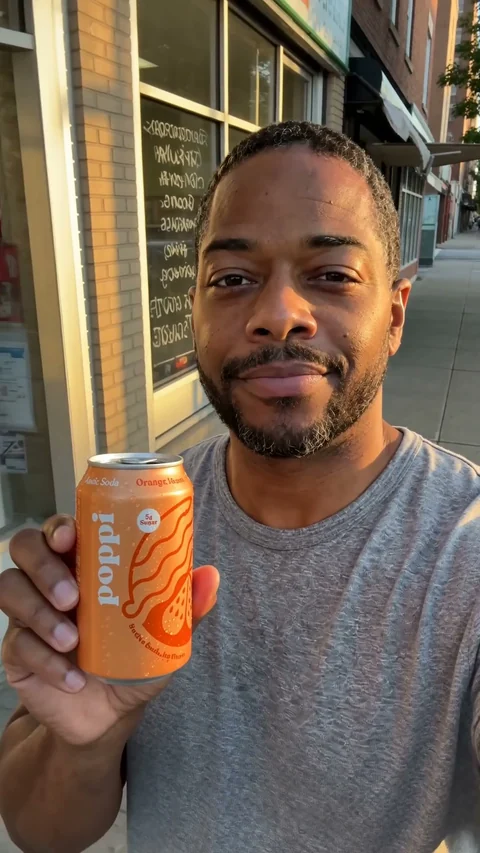
F. “Went in for milk”
Give him a dry, simple reminder for his next grocery run.
Spoken lines & audio notes
“I went in for milk. I came out with this.” [lifts the can into frame] “Orange cream. Five grams of sugar. Tastes like the one I grew up on.” [shrugs] “And no, I did not get the milk.” Ends on the animated Orange Cream end card with a can-open sound effect.
Before Step 1
Hold the face still. Change the belief.
One run of this workflow is a batch: one narrow audience, one product, one creator, and three ads. Hold the creator and product fixed so when an ad wins, you actually learn why it won.
Five things to gather before you open a tab
One real photo of your product. Use a clean pack shot on a plain or cut-out background with no hands in the frame. Real photos preserve gloss, foil, condensation, and print texture. Feed Higgsfield an illustration or AI mockup and the product looks artificial in motion.
Two short lists from legal (or the brand lead). First, the approved facts an ad is allowed to say (start with what is printed on the package). Second, the banned words an ad can never use.
Raw customer words. Collect reviews, ad comments, support emails, and Reddit threads. Step 1 explains which sources contain the clearest objections.
A Higgsfield plan with Marketing Studio, plus Claude or ChatGPT in your browser.
Any video editor with auto-captions. CapCut, Premiere, or Descript all work fine. Use whichever tool you already know.
Quick glossary:UGC is an ad shot to look like a real customer talking to their phone. A take is one generated video clip. A pack shot is a clean photo of the product alone; a cut-out has the background removed. An avatar is your saved AI presenter. 9:16 is vertical (TikTok, Reels, Shorts); 4:5 is the taller Meta feed format.
Open one fresh chat in Claude or ChatGPT and keep the whole batch inside it so you never have to repeat the rules. Fill in the highlighted brackets and paste Prompt 1 first.
Prompt 1 · Set up the chat · paste into Claude or ChatGPT
Full prompt (16 lines · click Copy above anytime)
You are helping me plan short, talk-to-camera video ads for a product. We will work in steps. I will paste one prompt for each step.

Rules for this whole chat:
- Write in plain, everyday words. No marketing jargon.
- Never invent a customer quote, a review, a number or a product fact. If you do not have it, say "I don't have that" and ask me.
- Use only the product facts in my approved list. Never use a word from my banned list.
- Keep every table short enough to read on one screen.

The product:
Brand and product: [BRAND AND PRODUCT]
What it is, in one sentence: [ONE SENTENCE]
Price and where it is sold: [PRICE AND WHERE]
Approved facts: [APPROVED FACTS]
Banned words and claims: [BANNED WORDS]

If anything above is missing or contradicts itself, ask me about it. If it is complete, reply with the word "Ready" and nothing else.
Worked example · poppi Orange Cream (unofficial spec)
Approved facts: the brand name, the flavor, “5g Sugar,” and “prebiotic soda” as the category. Every one of them is printed right on the can.
Banned words included: gut, digest, digestion, digestive, fiber, healthy, health, bloat, bloating, weight, detox, immune, immunity, cure, probiotic, doctor. Because poppi agreed in 2025 to settle a class action over gut-health claims, not a single ad claims what the drink does to your body.
Step 1 · Chat
Listen
Before you write a line of copy, gather the exact words used by people who bought your product or almost bought it and walked away. Give yourself 30 to 45 minutes.
Where the most useful lines appear
Three-star reviews of your product and its top two competitors. Five-star reviews say “love it.” One-star reviews complain about shipping. Three-star reviews tell you what people actually worried about.
Comments under your ads and your competitors’ ads. People often state their exact objection in six blunt words.
Reddit and forum threads where someone asks, “Is this actually worth it?”
Support emails and return reasons.
Fifty to a hundred short snippets is plenty. Remove customer names, emails, phone numbers, and order IDs before pasting. Use these snippets as research input, not copy to lift verbatim into an ad.
Prompt 2 · Sort the customer words · paste into the same chat
Full prompt (16 lines · click Copy above anytime)
Below are real customer words about my product and products like it. I copied them myself.

Read all of it and give me:

1. Five to eight narrow audiences. A narrow audience is a kind of person in a specific moment, not an age band. "Someone who gave up soda and misses it at 3 pm" is narrow. "Women 25 to 44" is not.

2. For each audience: the moment they are in, what they want, what annoys or worries them, and what they believe right now that stops them buying. Include worries that are near the product and not about it, such as how they feel when they give something up.

3. For each audience, two or three quotes copied word for word from what I pasted. Do not fix the grammar. If you have no quote for an audience, say so.

4. Any audience this product cannot honestly help. Say why.

A banned word may appear inside a customer quote. Keep the quote as it is. The ban applies to ad scripts, not to research.

CUSTOMER WORDS:
[PASTE CUSTOMER WORDS]
Check the output against your raw text. Use Cmd+F on your pasted reviews to verify a few quotes. If the AI rewrote or invented a quote, point it out and make it redo the list. Check the audiences too: you want specific situations (“sitting in the car after the gym”), not broad age brackets (“health-conscious millennials”).
Run the talk test. Ask the AI to draft a casual script before you finalize the brief so you can see where it lacks real proof.
Prompt 3 · The talk test · paste into the same chat
Take the three audiences with the most quotes behind them.

For each one, write a 60-word script of one person from that audience talking to a friend about my product. Use the kind of words that are in their quotes. Use only my approved facts.

Then, for each script, tell me:
- Which line was hardest to write honestly?
- What would I need to know or show to make that line true?

If you cannot write an honest script for an audience, say so. That is a useful answer.
Skip past how polished the draft scripts look and read the two questions underneath each one. Those answers show what you still cannot prove. Then read the scripts out loud. Any sentence that sounds like a generic TV commercial means you do not understand that belief clearly enough yet.
Step 2 · Chat
Pick one audience
Trying to talk to everyone in a 15-second video leaves you connecting with no one. Pick the one audience where you have real proof and write it down on a half-page audience card. That card becomes your brief.
Prompt 4 · The audience card · paste into the same chat
I choose this audience: [AUDIENCE]

Fill in this card. Keep each line to one or two sentences.

- Who they are and the moment they are in:
- What they believe now, the way they would say it to a friend. If it is a real quote, add (quote). If it is your wording, add (our wording):
- What they must come to believe before they will buy:
- The proof that moves them. It must be something we can show or say in a 15-second video, using only my approved facts:
- Is the person who uses it the same person who buys it?
- The bet, in this exact form: "People who want ___ will buy when we show them ___."
Worked example · Orange Cream audience card
Who and when: A guy between 35 and 45 who grew up on orange soda, quit soda in his thirties, and sees the pastel can in the fridge as his wife’s drink.
Believes now: “That’s a wellness drink. It’s not real soda and it’s not for me.”
Must come to believe: It tastes like the orange cream soda he grew up on, and it only has 5g of sugar.
Proof: An honest first sip and reaction on camera, plus the “5g Sugar” badge printed on the can.
User and buyer: Different people here. His wife buys them.
The bet: “People who want the soda they grew up on will buy when we show them a guy like them take a first sip and admit it tastes like the real thing.”
Check the wording on the card. The “believes now” line should sound direct and slightly skeptical. If it reads politely (“they want a healthier beverage option”), that is marketing phrasing rather than a real belief. Ask the chat to rewrite it the way a buyer actually talks when staring into the fridge.
Step 3 · Chat
Map three ads
Someone who has never heard of your brand does not need the same 15 seconds as someone who has walked past your can at Target for three months.
Eugene Schwartz mapped five levels of buyer awareness in Breakthrough Advertising. At Tier 11, my team added a sixth (“outcome aware”) for customers who already bought once and need a reason to buy again (more on the six levels):
Match each ad to how close the viewer already is to buying.
Level
Where they are
What they need
What the ad does
Unaware
Don’t know they have a problem
Curiosity
Stops the scroll with a story or unexpected moment
Problem aware
Feel the problem, don’t have a fix
Hope
Shows the relief or “after” state
Solution aware
Know fixes exist, don’t know you
Clarity
Shows plainly how your product solves it
Product aware
Know you, aren’t convinced it’s for them
Assurance
Shows proof for people like them (approved facts only)
Most aware
Already like you, haven’t bought yet
Novelty
Gives a real reason to act now (new flavor, real offer, reminder)
Outcome aware
Used it before, drifted away
Nostalgia
Reminds them how good it was to have around
Pick the three levels that fit your audience best, one ad each. (If only two make sense, make two. Never pad a batch.) Because the presenter is AI-generated, every ad focuses on taste, look, feel, or a relatable situation, never a made-up personal health or financial result.
Prompt 5 · Three ads, one per belief · paste into the same chat
Full prompt (18 lines · click Copy above anytime)
Here are six levels of awareness:
1. Unaware: they don't know they have a problem. They need curiosity.
2. Problem aware: they have a problem but don't know how to fix it. They need hope.
3. Solution aware: they know fixes exist but don't know my product. They need clarity.
4. Product aware: they know my product but aren't sure it's right for them. They need assurance.
5. Most aware: they believe it's right for them but need a true reason to buy now. They need something new.
6. Outcome aware: they've used my product and need a reason to buy more.

For the audience on the card, choose the three levels that matter most and plan one ad for each. Give me a table with these columns:
- Level
- What the viewer believes when the ad starts
- The job of this ad, in one sentence
- The first line the person says, in 12 words or fewer
- Where the person is and the one thing they do

Rules: each ad changes one belief. No two ads may have the same job. Use only my approved facts. Choose places with no shop signs, posters or screens in view, such as a kitchen, a car, a backyard or a quiet street.

The same person appears in all three ads. Under the table, describe that person in one sentence: someone this audience would see as themselves or a friend.
Worked example · the three Orange Cream ads
Level
Believes at start
Job of the ad
First line
Where
Problem aware
“I miss soda and nothing replaces it.”
Name what he misses, then show his first sip on camera
“I quit soda three years ago.”
Back steps of his house
Product aware
“That pastel can is a wellness thing.”
Let him admit he misjudged the drink
“My wife keeps buying these and I never touched one.”
Leaning on the kitchen counter
Most aware
“I like it, I’ll grab some eventually.”
Give him a simple reminder for his next grocery run
“I went in for milk. I came out with this.”
Walking down a quiet sidewalk
The person: A guy around 38 with a dry sense of humor, wearing a plain gray t-shirt.
Quick check. Cover the “Job of the ad” column and read only the three opening lines. If two sound like variations on the same pitch, cut one and choose a different awareness level.
Step 4 · Chat
Write the scripts
This is where most teams try to fit too much into one video. A 15-second ad comfortably holds 30 to 40 spoken words, leaving space for a sip, a pause, or a look at the can. Push past 50 words and the presenter rushes the read or gets cut off mid-sentence.
Prompt 6 · The scripts · paste into the same chat
Full prompt (14 lines · click Copy above anytime)
Write the script for each of the three ads.

Rules:
- 30 to 40 spoken words for each script.
- One person talking to their phone, the way they would talk to a friend. Short sentences. Contractions.
- The script opens with the first line from the table.
- Put at most two or three simple actions in square brackets, such as [takes a sip] or [looks at the can].
- Product facts come only from my approved list. Use at most two facts in a script, and write them the way a person says them out loud, such as "five grams of sugar". The rest is a small, ordinary story and a reaction.
- The script moves from what the person believed to what they think now.
- The person may react to taste, look, feel or how easy something is. The person may not report a result, such as a health change, weight, money saved or time saved.
- Never use a banned word.
- End on a plain line, not a slogan.

After each script, give me the spoken word count and confirm that no banned word is in it.
Worked example · “I owe her an apology” (38 words)
“My wife keeps buying these and I never touched one. I figured it was a wellness thing. We ran out of everything else.” [looks at the can, then back at the camera] “I owe her an apology. Orange cream. Five grams of sugar. It’s just good soda.”
Four checks before leaving the chat
Read it on a stopwatch. Use a normal talking speed and aim for 11 to 13 seconds so physical actions have time to land. If it runs long, cut words instead of reading faster.
Listen for “label voice.” If it sounds like someone reading the nutrition panel out loud, drop down to one product fact and keep the moment natural.
Review compliance yourself. Never rely on an AI check or a banned-word list as your final legal sign-off.
Treat them like an actor, not a customer testimonial. Your AI presenter has never drunk the product. They can react to taste or convenience, but they cannot report a personal health or financial result.
Step 5 · Higgsfield
Set up the creator and the product
You do this once per batch. Both assets save to your Higgsfield library and carry across every take.
Open Marketing Studio in Higgsfield. In the center bar, click Video. Open Choose style, pick UGC under Video, and select the Review card. Two slots appear in the bar: AVATAR and PRODUCT.
The creator
Use your one-sentence description from Step 3 and keep that exact avatar across all three ads.
Generate (“From a text prompt”): paste the portrait prompt below.
Upload (“Turn any photo into an avatar”): only upload a real person’s photo with their written permission.
Once created, your creator lives under My avatars. Select them from there on every take.
Creator portrait · paste under Create avatar → Generate
Candid phone-camera portrait photo of [AGE, LOOK AND HAIR], [EXPRESSION], looking straight into the lens. Plain [COLOR] t-shirt, no logos, no text. Head and shoulders, hands out of frame. Standing in [AN ORDINARY PLACE], soft daylight from a window, background slightly out of focus. Natural skin texture with pores, no retouching, true-to-life color. Looks like a real photo taken on a recent phone, not a studio shot.
Worked example · the Orange Cream creator
“Candid phone-camera portrait photo of a man about 38 years old, Black, short hair with a little gray at the temples, short neat beard, relaxed dry half-smile, looking straight into the lens. Plain heather-gray crew-neck t-shirt, no logos, no text. Head and shoulders, hands out of frame. Standing in an ordinary suburban home kitchen, soft daylight from a window…”
(On poppi we generated this portrait as a still first and uploaded it. Both routes give you the same reusable avatar.)
The product
Where this goes in Higgsfield · Product
Click PRODUCT → Assets opens → pick your route:
Upload from link: paste your product URL and let Higgsfield pull the name and images.
Add product → Create manually: upload your own pack shot directly.
Keep one real, clean photo with no hand in it. If the URL importer pulls extra lifestyle shots or renders, remove the extras and keep the real pack shot.
First-run note: the manual product-upload form sits behind login, so confirm its exact field labels inside your account.
Step 6 · Higgsfield
Roll takes and pick
Turn scripts into five-part video prompts
Do not over-direct Higgsfield. Specifying can tilts, exact label angles, and finger placement makes the acting stiff and introduces extra hands (read how I learned that across 1,360 credits). Marketing Studio already knows how to stage shots. Give it five clear parts in 100 to 125 words and let the model handle the shot plan.
Prompt 7 · The video prompts · paste into the same chat
Full prompt (18 lines · click Copy above anytime)
Turn each script into a video prompt for Higgsfield Marketing Studio. The same person is in all three.

Write each prompt as one paragraph of 100 to 125 words, with these five parts in this order:
1. The camera. Use "UGC selfie video, vertical, front phone camera held at arm's length." or "UGC selfie video, vertical, front phone camera propped on the [SURFACE]."
2. The place and the product: where the person is, the light, and what they hold, with "label facing camera".
3. The tone, in a few words.
4. The words "Exact dialogue:" and then the spoken lines in double quotation marks, with the actions between them in plain words outside the quotation marks.
5. The finish: "Natural skin texture, [PLACE] ambience, no music, no on-screen text."

Rules:
- Call the person "the man (the avatar)" or "the woman (the avatar)".
- Only spoken words go inside double quotation marks. Use no other quotation marks anywhere in the prompt.
- Do not say which way the label turns, how the pack tilts or what the fingers do.
- No shops, signs, posters or screens in the place.
- Do not write an action or a sound you do not want to see, such as opening the pack.
- When the person holds the phone, they have one free hand. Keep every action possible with one hand, or prop the phone. The product is ready to use when the video starts.

Give me each prompt in its own block with its word count.
Worked example · video prompt for “I owe her an apology”
UGC selfie video, vertical, front phone camera propped on the kitchen counter. The man (the avatar) leans on the counter in his home kitchen, soft daylight from the window, holding a cold orange can of poppi Orange Cream, label facing camera. Dry, a little sheepish, like he is admitting something. Exact dialogue: “My wife keeps buying these and I never touched one. I figured it was a wellness thing. We ran out of everything else.” He looks at the can, then back at the camera: “I owe her an apology. Orange cream. Five grams of sugar. It’s just good soda.” Natural skin texture, quiet kitchen ambience, no music, no on-screen text.
Hit generate
Where everything goes in Marketing Studio
Move left to right across the center bar:
Click Video on the left.
Confirm the style button reads Review. (Our poppi takes ran through the CLI in plain UGC mode. Review is the closest web card; if a take feels staged, try At home.)
Leave Hook blank. That control adds visual effects; your opening spoken line is the hook.
Click Setting and pick the closest match (Kitchen, Car, Street, Nature, etc.), or leave it blank and let your prompt set the location.
Switch aspect ratio from 3:4 to 9:16.
Slide length down to 15s.
Leave the counter at 1/4 (one take per click).
Select your saved creator in AVATAR and your real pack shot in PRODUCT.
Paste the single prompt paragraph into “Describe the video you want to create...” (leave out the title and word count).
Review the credit cost on GENERATE and click. Expect roughly 5 to 9 minutes per take.
Your clip lands on the page and under My generations. Watch with sound, then download.
First-run note: if your account UI offers a quality toggle or sound switch, select 1080p for live exports and keep sound enabled. In Nov 2026 via CLI, a 15-second take ran 75 credits at 720p and 195 credits at 1080p.
Inspect every take like an editor
Watch each clip twice. First with sound on for timing and delivery. Second with your eyes on the product. Ask four questions:
1Check 1:
Is the brand name right every time it is readable? Pause and zoom in before rejecting a take. A sideways logo often looks broken at thumbnail size when it is actually fine.
2Check 2:
Are the hands normal? Check for five fingers and no extra hands appearing in frame.
3Check 3:
Does the product look real? Check that the gloss, color, and proportions match your pack shot.
4Check 4:
Is any background text unreadable? Also catch ad-libbed lines, unapproved claims, or unintended sound effects (such as a can opening when nobody opened a can).
What a miss looks like, and why one tweak fixes it
Diagnose before editing the prompt. For a random glitch (flipped logo, strange hand), re-roll the exact same prompt first. For a prompt-caused glitch (unreadable signs because you placed the presenter outside a storefront), change that one variable and roll again. Here is Take 1 vs. Take 2 of Orange Cream’s “Went in for milk”:
FAIL · F-take1
Outside a storefront
Unreadable chalkboard text behind his shoulder and garbled “Orange I6am” on the can rim.
PICK · F-take2
Quiet residential sidewalk
One prompt edit (storefront replaced with a quiet sidewalk). No background text and a clean, readable can.
Across both poppi batches, 2 of 8 native 1080p takes failed visual inspection on label issues (a plain re-roll fixed Batch 1’s Ad C; replacing the storefront fixed Batch 2’s Ad F). Plan for roughly four takes to produce three finished cuts.
Quick diagnosis when a take misses.
What went wrong
The fix
Misspelled or flipped brand name
Re-roll once unchanged. If it repeats, verify that your product asset is a sharp real photo.
Unreadable signs or posters in back
Move to a sign-free place: kitchen, car, backyard, or quiet residential street.
Stiff acting or an extra hand
You are over-directing. Keep “label facing camera” and remove tilt, angle, or finger instructions.
Avatar reads stage directions out loud
Check for stray double quotes. Only spoken words belong inside quotation marks.
Unintended sound effect (can opening)
Remove the action word from the prompt, or make the action happen cleanly on camera.
Wrong nails or mismatched hand
Check your product photo for a stray hand. Swap in a clean pack shot.
Product looks artificial or flat
You likely uploaded a render or illustration. Replace it with a real photograph.
Same glitch three takes in a row
Stop spending credits. Audit the pack shot first, then simplify the prompt back to five parts.
Step 7 · Finish
Finish and log
Higgsfield gives you the raw 15-second take. Your editor turns it into a finished ad, usually around 18 seconds once the end card is added.
Captions. Run auto-captions, then proofread word by word against your script because auto-captions often misspell brand names. Keep captions accurate to what is actually spoken; if the avatar altered a fact, discard the take. Place text in the center safe zone, clear of TikTok and Reels UI buttons.
End card. Add roughly three seconds on the tail: your real product cut-out on the package’s main color, one short line, and a button graphic (the clickable link lives in the ad platform). Build the template once and swap only color, pack shot, and copy next time.
Loudness. Raw takes vary widely in volume. Level spoken segments (around -15 LUFS) so the whole batch plays evenly in the feed.
Ratios. Export 9:16 for TikTok, Reels, and Shorts, plus a 4:5 crop for the Meta feed, checking that face, product, and captions stay framed.
AI disclosure & sign-off. Toggle each platform’s AI disclosure setting, and have whoever owns the approved-facts list watch every finished export once with sound before spending budget.
Want captions, loudness leveling, animated end cards, and dual 9:16 and 4:5 exports automated in Python? See how the CLI kit handles it →
Keep a simple, consistent run log
Use one spreadsheet with one row per take, including rejects, and save the exact prompt beside each row. After three batches, you stop guessing what AI creative costs and read your own pass rate instead. On Orange Cream, four 1080p takes produced three keepers at 260 video credits per finished ad.
What a real log looks like: every miss recorded right beside the fix.
Date
Ad
Take
Result
Why
Credits
What changed
19 Nov
Went in for milk
F-take1
Fail
Garbled flavor name, unreadable storefront signs
195
None
19 Nov
Went in for milk
F-take2
Picked
Clean
195
Moved scene to a quiet residential sidewalk
Field notes
Ten lessons I paid for so you don’t have to
1Lesson 1:
Always use a real photo of the product. An AI-generated reference improved our spelling and made the can look artificial.
2Lesson 2:
Short prompts work better. Describe what happens and let Higgsfield direct the camera.
3Lesson 3:
Re-roll before you rewrite. A fresh take is cheaper and better than over-complicating the prompt.
4Lesson 4:
Change one variable at a time. Otherwise you cannot tell what fixed the shot.
5Lesson 5:
Double quotes mean spoken words only. Put quotes around anything else and the avatar may read your stage directions out loud.
6Lesson 6:
Keep signs out of your backgrounds. Storefronts produce unreadable lettering. Kitchens, cars, and quiet sidewalks stay clean.
7Lesson 7:
Lock the face and product, and vary the belief. That is how a winning ad teaches you why it won.
8Lesson 8:
Spell numbers the way people speak them. Write “five grams of sugar,” not “5g.”
9Lesson 9:
Zoom in before discarding a take. We almost rejected a clean take because a sideways logo looked distorted at thumbnail size.
10Lesson 10:
Know what Ad Reference does. It copies a reference ad’s pacing and writes its own script (disabling Hook and Setting). That is useful for borrowing a proven structure, as long as you audit every word it writes against your approved facts.
The whole playbook on one screen
Every manual browser step, its output, and where it maps in the 5-stage CLI kit.